
Contact Form Optimization: Turn Forms Into Funnels
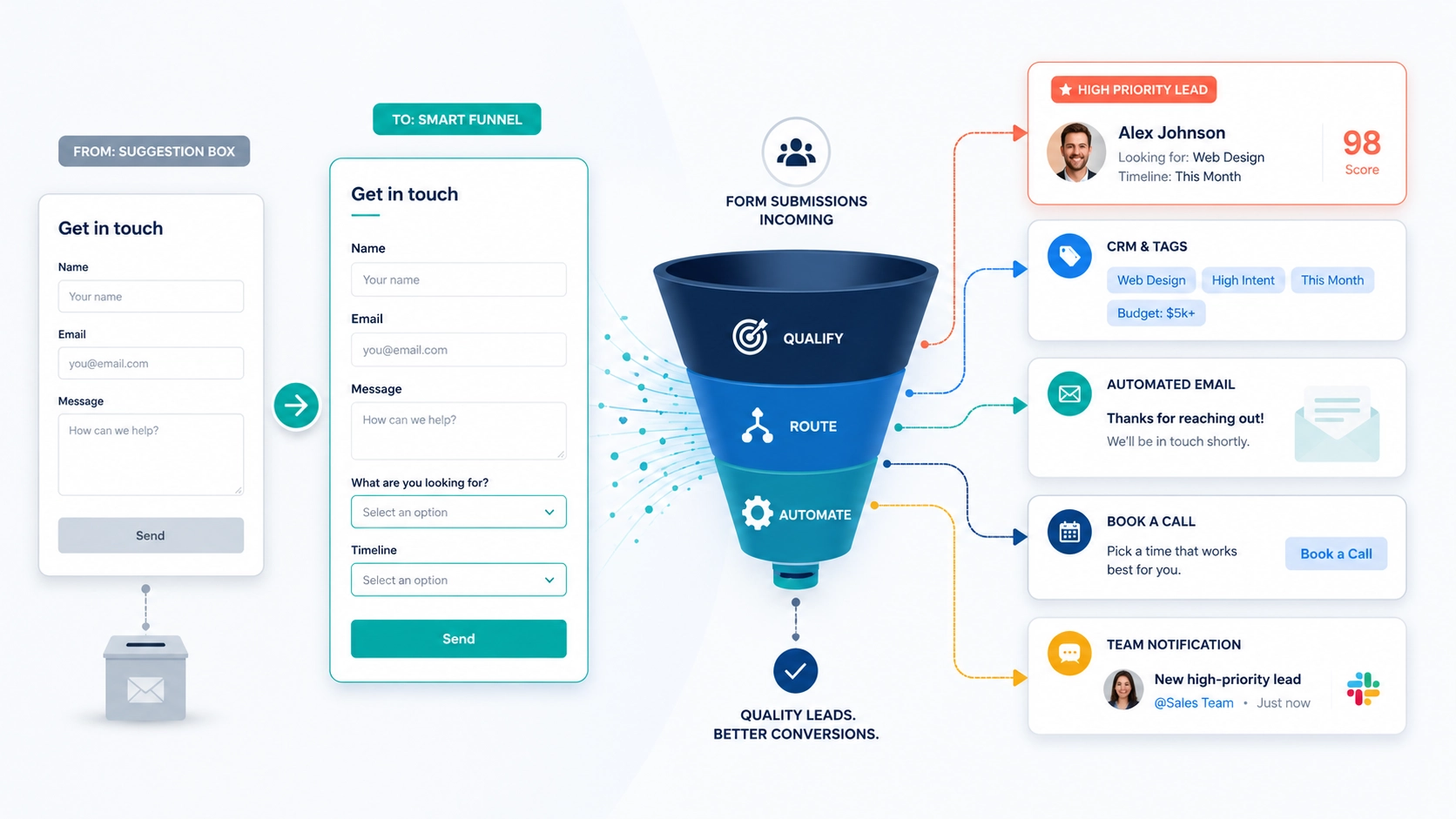
Your website’s contact form is probably the laziest part of your digital operation. For most businesses, it’s a barren landscape of three fields: name, email, and a giant, hopeful text box labeled “Message.” It’s the digital equivalent of a suggestion box nailed to a wall. It collects information, sure, but it does absolutely nothing to help you act on it.
TL;DR – Key Takeaways
- The standard “name, email, message” form treats every inquiry, from a hot lead to a simple question, with the same low priority.
- Adding one or two strategic fields, like a dropdown for “Service Needed” or “Timeline,” turns your form into an active lead qualification tool.
- Connecting your form to a CRM or email marketing platform automates sorting, tagging, and follow-up, which dramatically cuts down your manual workload.
- This automation enables faster response times, which directly leads to higher conversion rates because you’re engaging leads while they’re still hot.
Why Your Contact Form Is a Digital Black Hole
Every time someone fills out that generic form, the submission lands in your inbox like an unaddressed piece of mail. You have to open it, read through a potentially rambling paragraph, and manually decipher the sender’s intent. Is this a million-dollar project or someone asking for your office hours? Is their need urgent or are they just kicking tires? You have no idea until you invest your own time to figure it out.
This process is a crock. It creates a bottleneck. You end up with a single inbox full of mixed signals, forcing you to treat a high-value prospect with the same initial process as a spam bot. This manual sorting slows down your response time, and in the world of online leads, speed is everything. Ever heard of the Eisenhower Matrix? A simple and effective way for this type of chaos.
From Passive Collector to Active Qualifier with Smart Fields
The solution isn’t a longer, more complicated form. Nobody wants to fill out a tax return just to ask a question. The fix is a smarter form. A smart form uses intentional fields to help you understand a visitor’s needs before they even hit “submit.”
What Smart Fields Look Like in Practice
A smart field is any input that categorizes the user’s intent without making them write an essay. Dropdown menus are your most valuable tool here. Consider adding just one or two of these to your existing form:
- What are you looking for? With predefined options like “New Website Project,” “Website Redesign,” “SEO Services,” or “General Inquiry.” This instantly tells you which bucket the lead falls into.
- What is your ideal timeline? With options like “Within 30 days,” “1-3 Months,” or “Just Exploring.” This field is pure gold, it lets you prioritize urgent leads without a single second of manual review.
The key here is restraint. Every field you add introduces a tiny bit of friction that can lower your completion rate. For most service-based businesses, a total of three to five fields, including name and email, is the sweet spot. Gather the essential qualifying data first, and save the deep dive for the follow-up call.
Wiring Your Form to Your Workflow
A smarter form is only half the battle. The real magic happens when you connect that data to your other business systems. A form that just sends an email is still creating manual work for you. A form that talks to your CRM, project management tool, or email platform, now that’s an asset.
Most modern form tools, whether it’s a WordPress plugin like Fluent Forms or a SaaS platform like Typeform, can integrate directly with hundreds of other applications. You can also use a connector service like Zapier/Make/n8n to bridge any gaps.
Here’s a glimpse of how we set this up at inputidea. When a prospect fills out our contact form:
- We map each dropdown selection to a specific tag in our CRM.
- A lead who selects “New Website Project” and “Within 30 days” is automatically tagged as a high-priority lead.
- This tag triggers an automation that instantly sends them a personalized confirmation email with a link to book a discovery call.
- Simultaneously, a notification pings our team in Google Chat so we know a hot lead just came in.
Meanwhile, someone who selects “Just Exploring” gets tagged differently. They receive a friendly welcome email that kicks off a gentle, long-term nurture sequence. The business owner, in this case me, doesn’t have to lift a finger to sort, prioritize, or send that initial response. The system handles the triage.
Pro Tip: Customize Your Confirmation Message
Don’t just rely on email. The on-screen message that appears after someone submits your form is valuable real estate. Instead of a generic “Thank you for your message,” customize it based on their input. If they selected “SEO Services,” your message could say, “Thanks for your interest in our SEO services! We’ll review your submission and get back to you within one business day. In the meantime, feel free to check out our case studies.” It’s a small touch that makes the experience feel immediately more personal and relevant.
The Payoff: Faster Responses, Better Relationships
Why does all this automation matter? Because research consistently shows that the odds of converting a lead drop dramatically after the first five minutes. If you’re manually sorting through emails, you’ve already lost. An automated system that qualifies and routes inquiries allows you to engage with serious prospects almost instantly, even if you’re a one-person shop.
When your first contact with a lead already references the specific service they asked about and acknowledges their timeline, the conversation starts on a much stronger footing. It shows you were paying attention. You’re not just another company with a generic auto-responder, you’re a potential partner who already understands their needs.
Frequently Asked Questions
Q: What are the best form plugins for a WordPress website?
For WordPress, we almost always recommend Fluent Forms for its power and extensibility. It has deep conditional logic and a huge integration add-on capability. Here are a couple other very popular options, Gravity Forms and WPForms are excellent, user-friendly options.
Q: Will adding more fields to my contact form lower my submission rate?
Yes, adding fields can increase friction and slightly lower submissions. However, the leads you do get will be much higher quality and better qualified. It’s about trading a small quantity of low-intent inquiries for a higher quality of serious prospects, which is a win for most businesses.
Q: How do I connect my form to a CRM like HubSpot or Mailchimp?
Most major form plugins offer official add-ons for popular CRMs. You typically install the add-on, provide an API key from your CRM, and then “map” the form fields to the corresponding fields in your CRM contact records. For tools without a direct integration, a service like Zapier/Make/n8n can act as the bridge.
Stop Suggesting and Start Selling
Your contact form shouldn’t be a passive receptacle for random thoughts. It should be the most efficient entry point into your sales funnel, a smart tool that qualifies, sorts, and routes new opportunities so you can focus on what you do best. If your inbox is a chaotic mix of spam and serious inquiries, it’s time for a change.
Carve out thirty minutes this week. Add one or two dropdowns to your form and connect them to your email tool or CRM. It is one of the highest-return, lowest-effort upgrades you can make to your entire digital strategy. If you need a hand wiring it all together, you know who to call.