
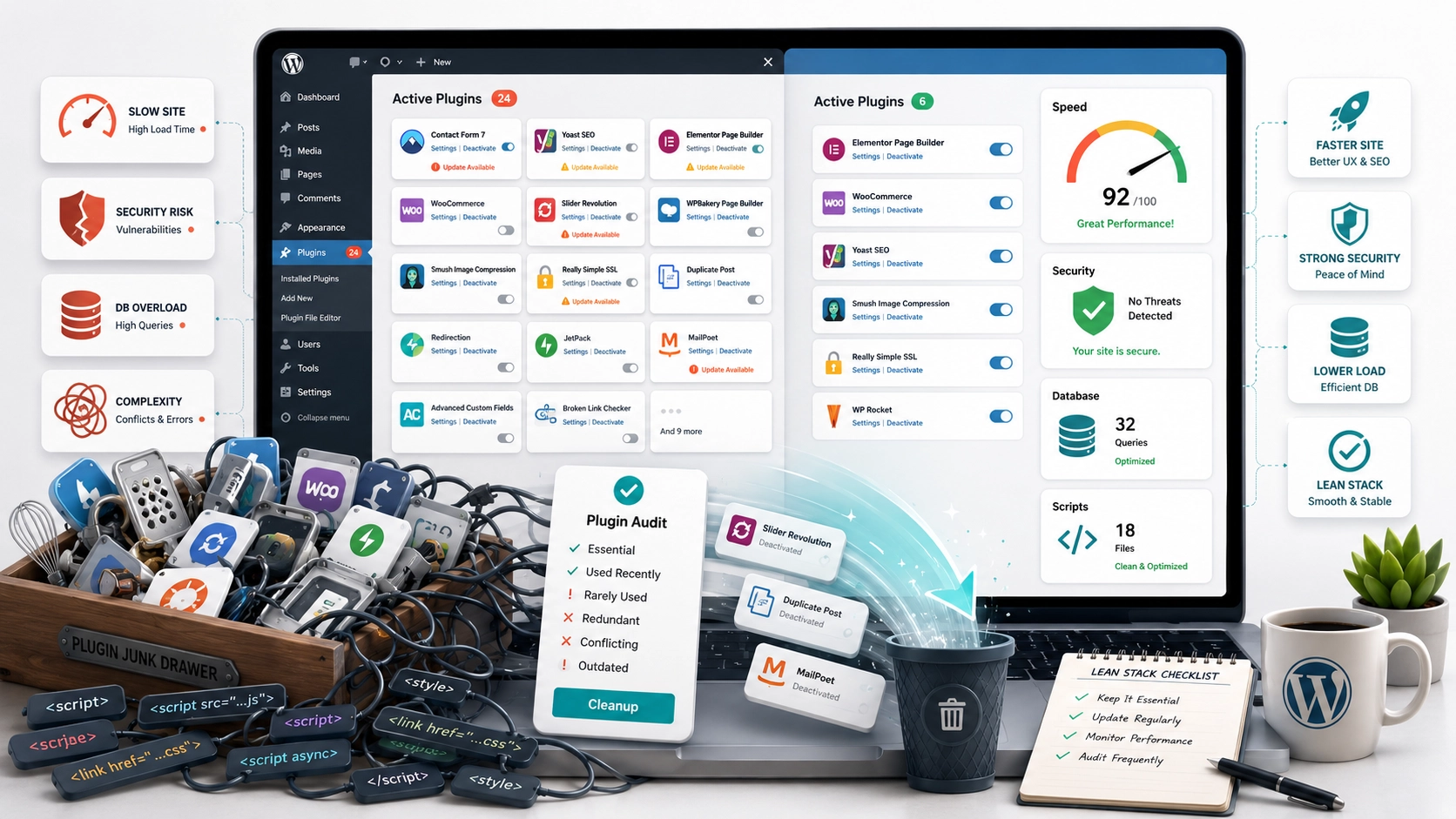
Hidden Cost of WordPress Plugin Bloat
Let’s talk about your WordPress plugins. They’re a bit like kitchen gadgets. You get one to solve a specific problem, and it seems perfectly reasonable at the time. But after a few years, you open the drawer to find a mess: a garlic press, an avocado slicer, three different corkscrews, and a strange device you can’t even identify anymore. Your WordPress dashboard has the same tendency to accumulate clutter.
TL;DR – Key Takeaways
- Unnecessary plugins dramatically slow down your website by adding extra code and database queries to every page load, which hurts your SEO and user experience.
- Every plugin, especially outdated ones, is a potential security vulnerability. More plugins mean more potential entry points for hackers.
- You must completely delete unused plugins, not just deactivate them. Deactivated plugin files can still be exploited on your server.
- Conducting a quarterly “plugin audit” is the most effective way to identify and remove performance bottlenecks and security risks.
When we audit a small business WordPress site at inputidea, we typically find somewhere between 18 and 30 active plugins. Some are essential, of course. You need plugins for security, backups, contact forms, and SEO. But a surprising number are leftovers from one-time experiments, duplicates doing the same job, or heavyweight solutions for lightweight problems. Each one adds a little bit of drag, a little bit of risk.
Performance: Death by a Thousand Scripts
Here’s a technical truth that many website owners don’t realize. Every active plugin can inject its own CSS and JavaScript files into your website’s code. Worse, they often do this on every single page, even on pages where the plugin’s functionality isn’t being used.
Think about it. A fancy slider plugin loads its animation library on your simple contact page. A social sharing plugin loads its icon fonts on your privacy policy. By itself, each script might only add 50 milliseconds to your load time. That sounds trivial, right? But when you multiply that across a dozen unnecessary plugins, you’ve tacked on half a second or more to every single page view. In the world of web performance, that’s an eternity. It directly impacts your Google rankings and, more importantly, your visitors’ patience.
This insidious slowdown is what we call “plugin bloat.” It doesn’t happen overnight. It’s a gradual accumulation of code that eventually strangles your site’s performance.
Security: Every Plugin Is a Door
While performance is a major concern, the security implications of plugin bloat are even more serious. The core WordPress software itself has a world-class security team behind it and a very fast cycle for releasing security patches. Plugins are a completely different story.
They are written by thousands of different developers with wildly varying levels of security expertise. Some are meticulously maintained, while others are abandoned after a few years. An outdated, unmaintained plugin is one of the most common ways we see WordPress sites get compromised. It’s like leaving a side door to your business unlocked and hoping no one checks the handle.
How to Spot the Risk
Go to the Plugins section of your WordPress dashboard right now. For every single plugin, look at the “Last updated” date. Here’s my rule of thumb:
- Updated in the last 6 months: Generally safe. The developer is likely active.
- Updated 6-12 months ago: Keep an eye on it. It might be stable, or it might be on its way to being abandoned.
- Not updated in over a year: This is a major red flag. You should actively be looking for a modern, maintained alternative.
If you aren’t sure if a plugin is still needed, just deactivate it for a week. See if anything on your site breaks or if you get any complaints. If nothing happens, you have your answer. And when you decide to get rid of it, you must click “Delete.” A deactivated plugin’s files are still sitting on your server, a static target for automated hacking tools scanning for known vulnerabilities.
Your Action Plan: The Quarterly Plugin Audit
The goal isn’t to have zero plugins. That’s unrealistic. The goal is to have only the right plugins. By performing a simple audit every three months, you can keep your site lean, fast, and secure. It sounds technical, but you can absolutely do this yourself.
- Take a Full Backup: Before you touch anything, always create a complete backup of your website’s files and database. This is your safety net.
- Establish a Baseline: Go to a free tool like GTmetrix or Google’s PageSpeed Insights and run a test on your homepage. Note the load time and performance score. This is your starting point.
- Deactivate and Test: Deactivate one plugin that you suspect might be unnecessary or bloated. Clear any caching on your site, then run the speed test again. Did the load time improve significantly?
- Rinse and Repeat: Go down your list of plugins one by one, deactivating and testing. You will almost certainly find that two or three plugins are responsible for the majority of the bloat.
- Remove and Replace: Once you’ve identified the culprits, delete them. If they provided essential functionality, research a more lightweight, well-coded alternative.
After an audit, most of our clients end up removing five to ten plugins with zero loss of functionality. The result is a site that loads noticeably faster and is significantly more secure.
Pro Tip: Use a Staging Site
Deactivating plugins on your live website can feel a little risky. The professional way to conduct an audit is on a “staging site,” which is an exact clone of your live site on a private server. Most quality web hosts offer one-click staging environments. This allows you to deactivate, delete, and test plugins freely without any risk of breaking your public-facing website. Once you’re happy with the changes, you can push the clean, optimized staging site live.
Frequently Asked Questions
Q: How many WordPress plugins are too many?
There’s no magic number, as it’s more about the quality and purpose of the plugins than the quantity. However, if you have more than 20-25 plugins, it’s a strong signal that you should perform an audit to see if each one is truly necessary and well-optimized.
Q: Is it really safe to delete a plugin I’m not using?
Yes, it’s not only safe, it’s highly recommended for security. Just make sure you have a recent backup before you begin, in the rare case that deleting it causes an issue. Deleting the plugin removes its code from your server, eliminating it as a potential attack vector.
Q: Can a single “all-in-one” plugin replace multiple smaller ones?
Sometimes, yes. A well-coded framework or multi-purpose plugin can be more efficient than several single-task plugins. However, be cautious of “mega-plugins” that try to do everything, as they can be just as bloated as the collection of plugins they’re meant to replace.
A Leaner Site is a Better Site
Your website is a critical business asset, and it deserves a regular tune-up. Plugin bloat is one of the most common, yet easily fixable, issues that plague WordPress sites. By treating your plugins less like permanent fixtures and more like subscriptions you review periodically, you take back control.
Set a calendar reminder for 90 days from now. When it pops up, spend 30 minutes reviewing your plugin list. If a plugin isn’t actively earning its place, get rid of it. Your site’s speed, its security, and the future version of you who has to troubleshoot a weird problem will all be grateful.