
Email Deliverability 101: Stop Newsletters Landing in Spam
You spend an hour crafting the perfect newsletter. You’ve packed it with helpful tips, nailed the personal tone, and the design is clean. You hit send, and your email platform proudly reports thousands of emails as “delivered.” Here’s the hard truth, that metric is mostly a crock.
“Delivered” doesn’t mean “seen.” It just means the receiving server, like Gmail or Outlook, accepted the message. Whether it actually lands in the inbox, the promotions tab, or the dreaded spam folder is another story entirely. That decision depends on a set of behind-the-scenes technical handshakes that most business owners have never even heard of.
TL;DR – Key Takeaways
- The “delivered” rate from your email platform is misleading. It doesn’t tell you if your email landed in the inbox or the spam folder.
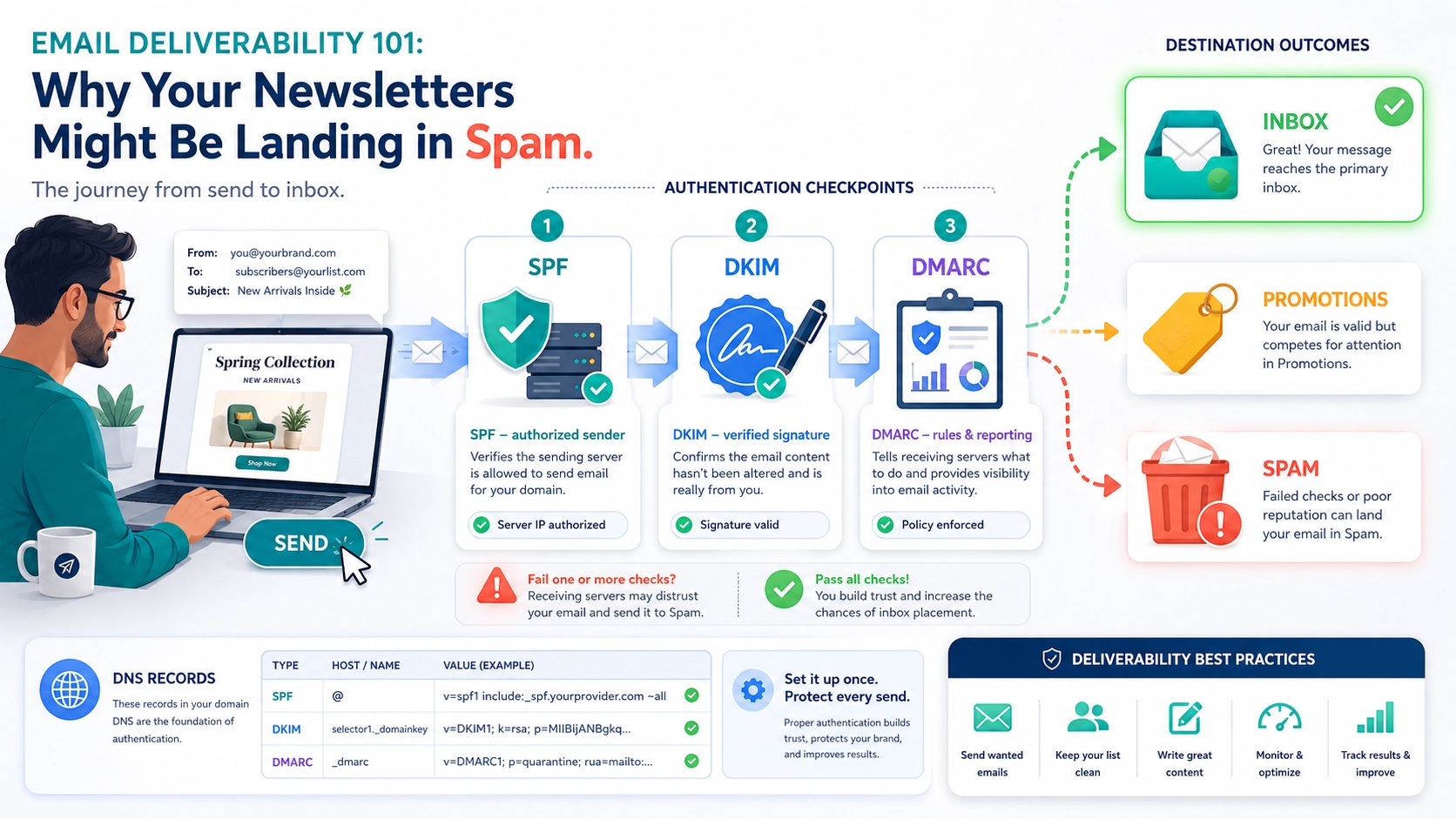
- Three critical DNS records, SPF, DKIM, and DMARC, authenticate your emails and prove to servers like Gmail that you are who you say you are.
- Setting these up is usually a one-time task that involves copying and pasting values from your email service provider into your domain’s DNS settings.
- You can check your domain’s configuration for free in minutes using online tools, immediately identifying major deliverability issues.
“Delivered” Isn’t the Goal, “Inboxed” Is
Think of an email server like a high-end restaurant’s kitchen door. Just because your delivery driver (your email platform) drops off the food (your email) doesn’t mean the head chef (the inbox filter) is going to serve it to the customer (your subscriber). First, the kitchen staff has to verify the delivery. Is it from a trusted supplier? Is the packaging sealed? Does it match the order they were expecting?
Email servers do the exact same thing. Before they place your message in a primary inbox, they run a series of automated security checks. If you fail these checks, your email gets flagged as suspicious. At best, it’s rerouted to a promotions tab. At worst, it’s sent straight to spam, never to be seen. The three most important of these checks are SPF, DKIM, and DMARC.
The Three Gatekeepers of the Inbox
These acronyms sound intimidating, I know. But the concepts behind them are surprisingly straightforward. They work together as your domain’s security team, vouching for every single email you send.
SPF: Your Domain’s Approved Guest List
SPF stands for Sender Policy Framework. In simple terms, it’s a public list of all the mail servers that are officially allowed to send email on behalf of your domain. It’s like a bouncer at a club with a strict guest list.
When you send an email from a platform like Mailchimp, ConvertKit, or Google Workspace, it’s not coming from your own computer, it’s coming from their servers. Your SPF record tells the world, “Yes, Mailchimp’s servers are on the guest list. They’re with me.”
If a receiving server gets an email from your domain but the sending server isn’t on your SPF list, it immediately raises a red flag. This is one of the most common and easiest-to-fix reasons for poor deliverability. Your email provider gives you the exact SPF record to add to your DNS, you just have to make sure it gets there.
DKIM: The Tamper-Proof Digital Seal
DKIM, or DomainKeys Identified Mail, is the next layer of security. If SPF is the guest list, DKIM is the tamper-proof seal on the invitation. It adds a unique, encrypted digital signature to the header of every email you send.
When the email arrives, the receiving server looks up your public DKIM key, which is stored in your DNS records. It uses this key to check the signature. If the signature is valid, it proves two things:
- The email genuinely came from your domain.
- The email’s content wasn’t altered in transit.
Without a valid DKIM signature, your email looks far more suspicious, making it an easy target for the spam filter. Like SPF, setting it up is a one-time task of adding a DNS record provided by your email service.
DMARC: The Rulebook for When Things Go Wrong
DMARC, which stands for Domain-based Message Authentication, Reporting, and Conformance, is the manager that ties it all together. It tells receiving servers what to do if an email claiming to be from you fails both the SPF and DKIM checks.
A DMARC policy can instruct servers to:
- None (p=none): Do nothing, just monitor the email and send me a report. This is the perfect place to start.
- Quarantine (p=quarantine): Send the failed email to the spam folder.
- Reject (p=reject): Block the email from being delivered entirely.
The real power of DMARC is in its reporting. It sends you detailed reports showing who is sending email using your domain, from where, and whether it’s passing authentication. This is invaluable for spotting misconfigurations and catching anyone trying to spoof your domain to send phishing emails.
How to Check Your Records in Under 10 Minutes
Worried your setup might be missing something? You can find out right now, for free. This isn’t some week-long technical audit. It’s a quick check that takes less time than writing your next email subject line.
Go to a free tool like MXToolbox or the Google Admin Toolbox. Enter your domain name and look for their SPF, DKIM, and DMARC check tools. The results will be immediate. If anything comes back with an error or is missing entirely, you’ve found a major source of your deliverability problems. Your email provider’s help documentation will have the exact records you need to add, or you can send the task to your web team (that’s us) to handle.
Pro Tip: Don’t Just Set DMARC and Forget It
Starting with a `p=none` DMARC policy is a safe and essential first step. But the goal isn’t to stay there forever. The reports DMARC sends you are a goldmine of information. Use a service like dmarcian or Postmark to translate the clunky XML reports into human-readable dashboards. Once you’re confident that all your legitimate email streams are passing SPF and DKIM, you can gradually move your policy to `p=quarantine` and eventually `p=reject`, effectively slamming the door on anyone trying to impersonate your brand.
Frequently Asked Questions
Q: Do I really need all three: SPF, DKIM, and DMARC?
A: Yes, absolutely. They serve different but complementary functions. SPF validates the sending server, DKIM validates the message integrity, and DMARC provides the overarching policy and reporting. Having all three in place is the modern standard for email authentication.
Q: Will this guarantee my emails never go to spam?
A: No, but it’s a critical first step. These records get you past the initial technical security gates. After that, factors like your content quality, sender reputation, and subscriber engagement still play a huge role in whether you land in the inbox.
Q: Where do I add these DNS records?
A: You add them in the DNS management panel for your domain. This is typically found where you registered your domain (like GoDaddy, Namecheap) or with your hosting provider if you’ve pointed your nameservers there (like Cloudflare, SiteGround).
Q: What if I use multiple services to send email?
A: Your SPF record needs to include every service that sends on your behalf (ie. Google Workspace, Mailchimp, your CRM). Be careful, as you can only have one SPF record per domain, but you can have multiple “include” mechanisms within it. Most services will provide setup instructions that account for this.
Stop Guessing and Start Authenticating
You can have the most brilliant email content in the world, but it’s worthless if no one ever sees it. Poor deliverability is often chalked up to bad subject lines or unengaged lists, but the root cause is frequently a simple technical misconfiguration.
Taking ten minutes to check your SPF, DKIM, and DMARC records is one of the highest-leverage activities you can do for your email marketing. It’s the difference between shouting into the void and having a real conversation with your audience.
If digging around in DNS settings sounds like your personal version of hell, don’t worry. That’s what we live and breathe. Get in touch, and we can run a quick audit and get your records squared away so you can get back to what you do best: running your business.